

- Product Highlights
- Seamless Conversion: Quickly and effortlessly convert your existing PROFIBUS DP slaves into standard PROFINET IO devices.
- Plug-and-Play Design: Features a compact connector form factor that installs directly onto the device's PROFIBUS port, requiring zero additional space in the control cabinet.
- Comprehensive Support: Fully compatible with PROFIBUS alarms, hardware diagnostics, and the DPV1 protocol.
- Automated GSDML Generation: Automatically convert configurations via our dedicated software to generate PROFINET GSDML files with a single click.
- Certified device renders PROFINET certification by the customer unnecessary.
Upgrading a PROFIBUS Slave to PROFINET
Effortless Integration from PROFIBUS to PROFINET
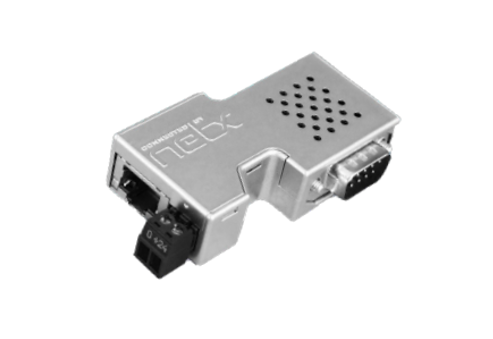
netLINK PROXY is a communication gateway specifically designed for retrofitting legacy equipment. It perfectly integrates any PROFIBUS DP slave into a higher-level PROFINET network architecture. Designed in the shape of a standard D-Sub connector, the device plugs directly into the PROFIBUS interface of the DP slave, while the other end connects to the PROFINET network via a standard RJ45 port.
On the PROFINET controller side, the netLINK PROXY operates exactly like an ordinary PROFINET IO device. It strictly follows the PI organization's Proxy guidelines, seamlessly mapping the process data of the PROFIBUS DP slave into the PROFINET Slot/Subslot addressing model to ensure real-time, stable data transmission.
Intelligent Software Configuration (SYCON.net) & Troubleshooting
System commissioning is highly flexible. Engineers can connect a PC directly via an Ethernet cable for setup. Alternatively, if a PROFINET switch is already installed on-site, remote troubleshooting and monitoring can be performed dynamically while the system is running.
netLINK PROXY utilizes the FDT/DTM-based SYCON.net software tool, providing an intuitive interface for network planning, parameter configuration, and real-time diagnostics. Your devices can be up and running in just a few simple steps.
Automated Generation of GSDML Files
Even if you do not have the original PROFIBUS GSD file for your legacy equipment, the powerful built-in scanning function of SYCON.net automatically detects and identifies all slave devices on the PROFIBUS network. Once the slave configuration and I/O data lengths are identified, the software automatically converts these parameters into a standardized PROFINET GSDML file. You simply import this file into the engineering environment of any PROFINET controller (such as a Siemens TIA Portal) to easily complete your hardware configuration.
Flexible Hardware Design & Installation Advantages
For hardware installation, the netLINK PROXY operates on a standard 24V DC power supply. During field wiring, power can be conveniently drawn directly from the DP slave device and connected to the 2-pin COMBICON terminal on the module, maximizing wiring efficiency. Furthermore, because the device is plugged directly into the communication port, the physical transmission distance for the PROFIBUS signal is extremely short—completely eliminating the need for an external bus terminating resistor.
In conclusion, for machine builders and system integrators looking to seamlessly and painlessly integrate existing PROFIBUS DP equipment into modern PROFINET industrial networks, the netLINK PROXY is undoubtedly the most cost-effective and practical solution.
Effortless Integration from PROFIBUS to PROFINET
netLINK PROXY is a communication gateway specifically designed for retrofitting legacy equipment. It perfectly integrates any PROFIBUS DP slave into a higher-level PROFINET network architecture. Designed in the shape of a standard D-Sub connector, the device plugs directly into the PROFIBUS interface of the DP slave, while the other end connects to the PROFINET network via a standard RJ45 port.
On the PROFINET controller side, the netLINK PROXY operates exactly like an ordinary PROFINET IO device. It strictly follows the PI organization's Proxy guidelines, seamlessly mapping the process data of the PROFIBUS DP slave into the PROFINET Slot/Subslot addressing model to ensure real-time, stable data transmission.
Intelligent Software Configuration (SYCON.net) & Troubleshooting
System commissioning is highly flexible. Engineers can connect a PC directly via an Ethernet cable for setup. Alternatively, if a PROFINET switch is already installed on-site, remote troubleshooting and monitoring can be performed dynamically while the system is running.
netLINK PROXY utilizes the FDT/DTM-based SYCON.net software tool, providing an intuitive interface for network planning, parameter configuration, and real-time diagnostics. Your devices can be up and running in just a few simple steps.
Automated Generation of GSDML Files
Even if you do not have the original PROFIBUS GSD file for your legacy equipment, the powerful built-in scanning function of SYCON.net automatically detects and identifies all slave devices on the PROFIBUS network. Once the slave configuration and I/O data lengths are identified, the software automatically converts these parameters into a standardized PROFINET GSDML file. You simply import this file into the engineering environment of any PROFINET controller (such as a Siemens TIA Portal) to easily complete your hardware configuration.
Flexible Hardware Design & Installation Advantages
For hardware installation, the netLINK PROXY operates on a standard 24V DC power supply. During field wiring, power can be conveniently drawn directly from the DP slave device and connected to the 2-pin COMBICON terminal on the module, maximizing wiring efficiency. Furthermore, because the device is plugged directly into the communication port, the physical transmission distance for the PROFIBUS signal is extremely short—completely eliminating the need for an external bus terminating resistor.
In conclusion, for machine builders and system integrators looking to seamlessly and painlessly integrate existing PROFIBUS DP equipment into modern PROFINET industrial networks, the netLINK PROXY is undoubtedly the most cost-effective and practical solution.
| Category | Parameter | Specification |
| General | Communication controller Type | netX 50 |
| Memory | RAM | 8 MB SDRAM |
| Memory | FLASH | 4 MB serial Flash, with bootloader, firmware and configuration |
| PROFIBUS Interface | Transmission rate | 9,6 kBit/s up to 12 MBit/s |
| PROFIBUS Interface | Interface Type | RS-485 (connected to power supply potential) |
| PROFIBUS Interface | Connector | DSub-Plug 9-pin |
| PROFIBUS Interface | Automatic Baud rate detection | Not supported |
| Ethernet Communication | Data transport | TCP/IP |
| Ethernet Communication | Number of connections | max. 16 TCP connections at a time |
| Ethernet Communication | PROFINET IO Controller connections | 1 |
| Ethernet Interface | Transmission rate | 10/100 MBit/s |
| Ethernet Interface | Interface Type | 100 BASE-TX, isolated |
| Ethernet Interface | Connector | RJ45- female |
| Ethernet Interface | Auto-Negotiation | supported |
| Ethernet Interface | Auto-Crossover | supported |
| Display | LED Display SYS | System Status |
| Display | LED Display COM | Communication Status |
| Display | LED Display ACT | Ethernet Activity Status |
| Display | LED Display LNK | Ethernet Link Status |
| Power Supply | Voltage | 18 ... 30 V DC |
| Power Supply | Current at 18 V | typ. 80 mA |
| Power Supply | Current at 24 V | typ. 70 mA |
| Power Supply | Current at 30 V | typ. 53 mA |
| Power Supply | Connector | Mini-COMBICON -Socket 3,81 mm 2-pin |
| Compliance & Environment | Emission | CISPR 11 Class A |
| Compliance & Environment | Immunity | EN 61131-2: 2003 |
| Compliance & Environment | Temperature range | 0 … + 50 °C |
| Compliance & Environment | Humidity | 0 … 85 % (no condensation allowed) |
| Device Specifications | Dimensions (L x W x H) | 74,5 x 40,7 x 17,2 mm |
| Device Specifications | Weight | appr. 35 g |
| Device Specifications | Mounting / Installation | onto PROFIBUS Socket |
| Device Specifications | Protection Class | IP 20 |
| Device Specifications | CE Sign | Yes |
| Software | Configuration Software | SYCON.net |
| Software | Software | Ethernet-Device Setup |