

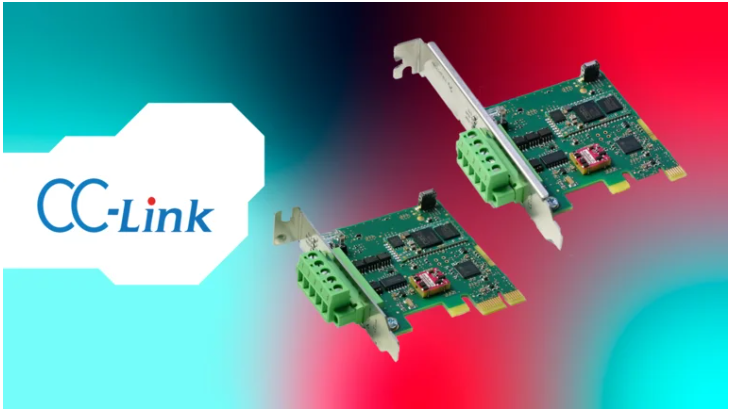
Hilscher is expanding its new netX 90-based PCI Express PC cards with two models for CC-Link Remote Device Station (formerly CC-Link Slave): the standard-height cifX PCIE90-CCS and the Low Profile cifX LPCIE90-CCS. The addition brings another well-established communication standard to the netX 90 portfolio and helps CC-Link-based systems keep running reliably while meeting today’s performance and cybersecurity requirements.
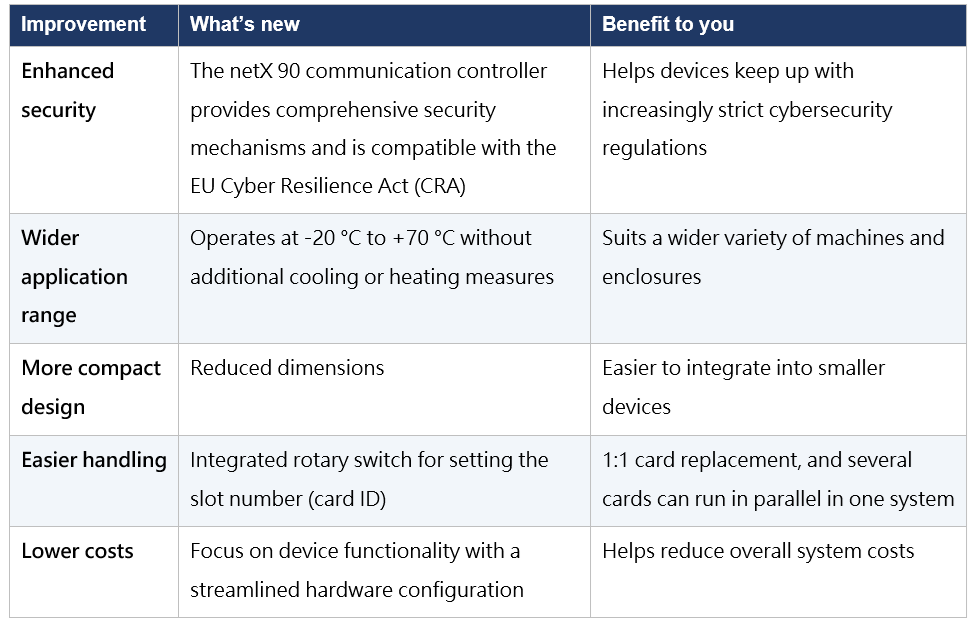
By adding CC-Link to the protocol coverage of its new netX 90 PC cards, Hilscher lets manufacturers keep their proven communication architecture while moving to a new hardware platform that meets today’s security requirements. Compared with earlier Hilscher PC cards for CC-Link, the new cards offer
five improvements:

Future-Proofing Established CC-Link Applications
Since its market launch in 1996, CC-Link has been running reliably in machines and plants around the world. For manufacturers of PC-based automation, CC-Link architectures in the field are usually proven and are not replaced lightly, yet the equipment still has to meet higher demands for performance and information security.By adding CC-Link to the protocol coverage of its new netX 90 PC cards, Hilscher lets manufacturers keep their proven communication architecture while moving to a new hardware platform that meets today’s security requirements. Compared with earlier Hilscher PC cards for CC-Link, the new cards offer
five improvements:
Which Model Should You Choose? Side-by-Side Comparison
Both cards share the same electrical and communication specifications. When choosing, consider the expansion slot height in your enclosure and which older card you are replacing:| Item | cifX PCIE90-CCS | cifX LPCIE90-CCS |
| Card format | PCI Express, standard height | Low Profile PCI Express |
| Part number | 1420.740 | 1421.740 |
| Replaces | CIFX 50E-CC | CIFX 70E-CC |
| Dimensions (L × W × H) | 79 mm × 21.6 mm × 121 mm | 79 mm × 21.6 mm × 80.3 mm |
| Weight | 50.7 g | 44.8 g |
| Installation | PCI Express x1 slot (3.3 V) | PCI Express x1 slot (3.3 V) |
| Protocol | CC-Link Remote Device Station (formerly Slave) | CC-Link Remote Device Station (formerly Slave) |
| Typical use | Standard-height expansion slots in industrial PCs | Slim enclosures that only offer low-profile slots |
Full Technical Specifications
Specifications common to the PCIE90-CCS and the cifX LPCIE90-CCS:| Category | Item | Specification |
| Communication controller | Type | netX 90 |
| Integrated memory | RAM | 8 MB SDRAM |
| Integrated memory | Flash | 8 MB + 1 MB |
| Power supply | Supply voltage | +3.3 V DC ±5 % (supplied via the PCI Express bus) |
| Power supply | Current | Typical 290 mA (at 3.3 V); maximum 300 mA (at 3.6 V) |
| Power supply | Typical power consumption | 957 mW |
| System interface | Bus type | PCI Express, one-lane port (x1) |
| System interface | Data access | Dual-port memory, 32 KB, 32-bit data width |
| System interface | Transmission rate | 2 Gbit/s |
| Communication interface | Communication standard | CC-Link |
| Communication interface | Interface type | RS-485, optically isolated |
| Communication interface | Connector | COMBICON plug, 5-pin |
| Displays | LED indicators | SYS (system status), L RUN (communication status, duo LED), L ERR (error status, duo LED) |
| Operating element | Rotary switch | Sets the slot number (card ID) |
| Ambient conditions | Operating temperature | -20 °C to +70 °C (air flow during measurement: 0.375 m/s, 50 %) |
| Ambient conditions | Storage temperature | -40 °C to +85 °C |
| Ambient conditions | Humidity | 10 % to 95 % relative humidity, non-condensing |
| Ambient conditions | Environment | Pollution degree 2 or better |
| Ambient conditions | Altitude | 0 m to 2000 m |
| Configuration | Configuration software | Communication Studio |
| Configuration | Firmware download | Device Explorer |
| Configuration | API | Yes |
| Conformity | Approvals and marks | RoHS, CE, UKCA |
| Conformity | EMC | Emission: EN 61000-6-3; immunity: EN 61000-6-2 |
Hardware and Software Integration: Drivers, API, and Configuration Tools
1. The protocol stack runs on the card, reducing host load
The complete protocol stack runs directly on the netX 90 on the card, and the host application exchanges data with the card through 32 KB of dual-port memory. The PC does not have to handle the real-time details of communication and can concentrate on application logic.2. One set of drivers and tools for every protocol and card format
Under Hilscher’s unified platform strategy, all cifX cards use the same drivers and tools, regardless of protocol or card format (M.2, PCIe, miniPCIe half-size, and others). If a manufacturer later changes the protocol or card format, the effort needed to adapt the software integration stays minimal.3. Drivers for many operating systems and a free C toolkit
Hilscher provides device drivers for a wide range of operating systems and software environments, plus a free C toolkit. Together with a standardized API, they let application developers access the card in a consistent way.4. Configuration and firmware update workflow
- Configuration: Use Communication Studio to configure the device.
- Firmware download: Use Device Explorer to load the firmware onto the card.
- Multiple cards: Use the rotary switch on each card to set its slot number (card ID), so several cards can be installed in one PC and told apart.
Frequently Asked Questions (FAQ)
Q1: What is the difference between the cifX PCIE90-CCS and the cifX LPCIE90-CCS?
Both cards share the same communication controller, memory, and electrical and communication specifications. They differ only in form factor: the PCIE90-CCS is a standard-height PCI Express card (121 mm high, 50.7 g), while the LPCIE90-CCS is a low-profile card (80.3 mm high, 44.8 g). Their part numbers are 1420.740 and 1421.740.Q2: Which CC-Link variant do these cards support? Can they act as a master?
They support CC-Link Remote Device Station. Master functionality is not supported.Q3: Can I install more than one card in the same PC?
Yes. Each card has a rotary switch for setting the slot number (card ID), so several cards can operate in parallel in the same system.Q4: What kind of slot does the host need?
A PCI Express x1 slot (3.3 V). The card is powered through the PCI Express bus (typical current 290 mA, typical power consumption 957 mW), so no separate power cable is needed.Q5: Which software do I use to configure the card and update the firmware?
Use Communication Studio for configuration and Device Explorer for firmware download. Hilscher also provides device drivers for many operating systems, a standardized API, and a free C toolkit.Q6: What interface connects the card to the CC-Link network?
An optically isolated RS-485 interface with a 5-pin COMBICON plug connector.